ProCalc · Revenue Accounting
ProCalc Revenue Accounting
From allocated volumes to owner statements and the Crown invoice.
What Revenue Accounting does
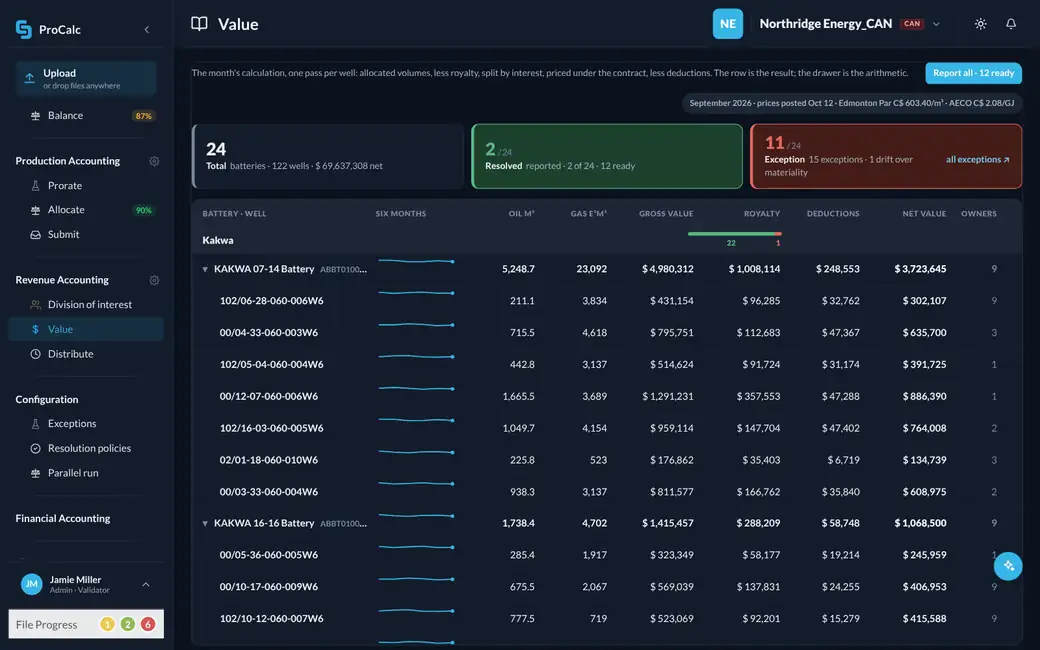
Revenue Accounting turns the month’s allocated volumes into money, in four steps. Value runs the month one well at a time: allocated volume, less royalty, split by interest, priced under the contract, less deductions, with sales checked against the purchasers’ statements. Distribute splits the value to the owners and takes it through approval. Pay is the payment run. Report posts the journal to your ledger and keeps the record. Who owns each well, what burdens it and who gets paid is the division of interest; it is set up from the gear beside Revenue Accounting, not worked as a step. It reads the same record as Production Accounting, so a number on an owner statement opens to the volume behind it.
Detailed walkthroughs
Leave your details and confirm your email to watch.
Inside Revenue Accounting
Value: sales against the purchasers’ statements
One pass per well: allocated volume, less Crown, freehold and overriding royalty, split by interest, priced under the contract, less deductions. Sales are checked against the purchasers’ statements. Open any row to see each line and where it came from. Move the batteries that are ready on to Distribute; the rest wait on their exceptions.
Distribute: the owners’ split and approvals
Each battery’s value is split to its owners and partners by their interests, and the split goes through approval before anything is paid. Every owner and partner gets a statement, and the Crown invoice is checked against what was accrued.
Pay: the payment run
The approved amounts are paid to the owners and partners in one payment run, from the same record as the statements.
Report: the journal and the record
The journal goes to Financial Accounting or your ledger, and the month’s record is kept: each value, split, approval and payment, traced back to the volume behind it.
Set-up, behind the gear: owners and interests
Set-up is not one of the steps. It opens from the gear beside Revenue Accounting, and the division of interest lives there: a register of owners, burdens and payees for every well, effective-dated line by line. Synced from your land system, or maintained here. A gap shows up as an exception in Value or Distribute, before it becomes a wrong statement.
Exceptions hold only what they affect
A missing royalty program, interests that do not sum to 100 percent, or a Crown invoice outside tolerance holds the battery it affects and nothing else. Fix it at the source, estimate it with its basis, or accept it with a reason. The decision stays on the record.
Drift after reporting
A late volume or price change is measured against your materiality after the month is reported and raised as an adjustment, so nothing is lost between months.
Same record as the meters
Every value traces back through Production Accounting to the well test, the battery measurement and the meter it came from.
On its own, or end to end
Revenue Accounting reads the shared data lake, so it can improve this one process while everything else connects by API or file — or run as part of the whole chain. About the ProCalc platform.
What comes in
- Prorated and allocated volumes from Production Accounting
- Ownership and burdens from your land system
- Prices and contracts
- Purchaser statements
- Crown royalty programs
What goes out
- Value by well and owner
- Owner and partner statements
- Crown invoice reconciliation
- Payment run
- Journal to Financial Accounting or your ledger
Rather have us do it?
Our team runs Revenue Accounting for customers every month. You send the raw data; we deliver the finished result, and you keep web access to everything behind it.
What customers say
All testimonialsWhen we experienced a change in staffing, we decided to explore new options for measurement record keeping. Cost savings were a priority, especially since our previous supplier required not only an annual fee but also a mandatory upgrade charge and a lengthy implementation process. I wasn’t heavily…
We are new business owners in the gas and oil industry and I cannot say enough great things about Critical Control and their team. We really enjoy the mobile app and the ability to scan in our charts and, even more importantly, to have production data at our fingertips. Our situation as a very…
The mobile chart scanning application on the phones is awesome. Late scanning and scanning errors are a thing of the past. All of my operators are thrilled with the ease of use and convenience of scanning the charts as they come off the readers.