
ProCalc · Production Accounting
ProCalc Production Accounting
Prorate, allocate and file, on the same record as the meters.
What Production Accounting does
Production Accounting is the Canadian production accountant’s month as three steps on one asset tree. A facility opens on its full month: every well, product, receipt, disposition, fuel, flare and inventory, with the source of each number one click away. Prorate shares each battery’s measured production out to its wells. Allocate hands what each gas plant and gathering system sold and used back to every stream that fed it. File is the month’s filing queue: the oil and gas pipeline splits, the volumetric, SAF/OAF and the partner statements, each a named filing with its own due date, its own checks and a preview before anything is sent, and the receiver’s reply comes back on the filing. Set-up is not a step: it opens from the gear beside Production Accounting. Everything the accountant touches is an exception on one of the three steps, and each one is fixed at its source, estimated with its basis, or accepted with a reason. Our own outsourced production accounting team closes customer months on it.
Detailed walkthroughs
Leave your details and confirm your email to watch.
Inside Production Accounting
Prorate: battery to wells
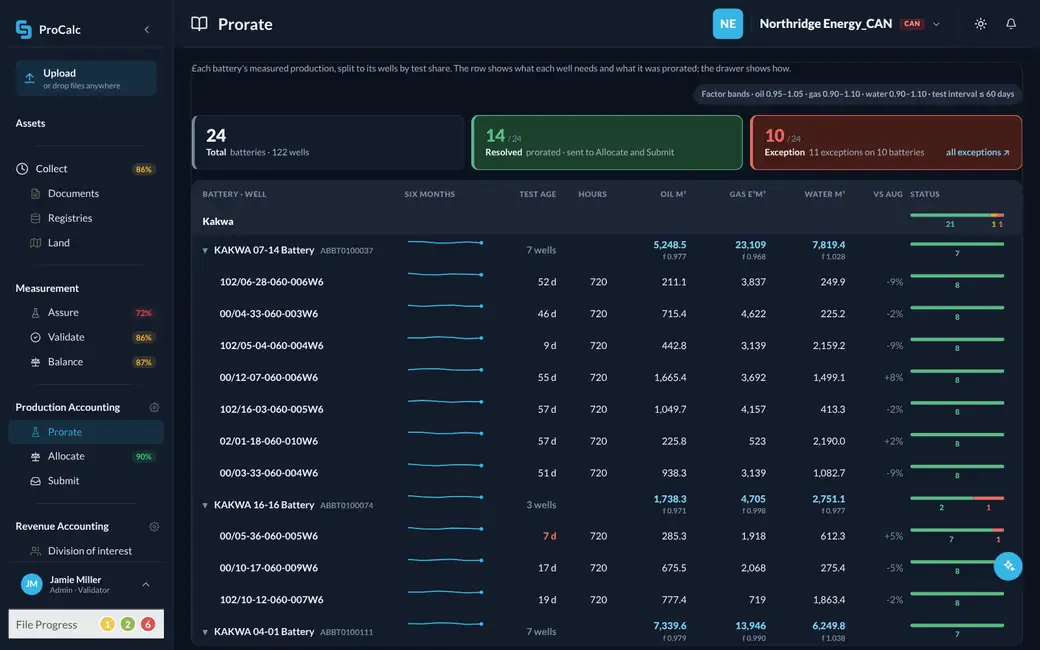
Each battery’s measured total is split to its wells by test share: test rate, hours on, theoretical volume. One factor per product, checked against the AER band. A stale test, short hours or a factor outside the band is an exception, and the drawer shows how every well’s number was built.
Allocate: gas plants and gathering systems to inlet streams
What each gas plant and gathering system sold and lost is handed back to every inlet stream in proportion to what it brought, product by product. Every column sums upward: wells to stream, streams to plant. Third-party plant statements are checked against what you delivered.
File: every filing, one queue
One row per facility; one named filing per submission: the oil pipeline split, the gas pipeline split, the volumetric and SAF/OAF to Petrinex, and the partner statements. Each has its own due date, its own blocking checks, a preview of what will be sent before anything is sent, and its own Submit; there is no generic submit. Filter to what needs attention, what is ready to send and what is filed. A TIK royalty line sits in every split, and the volumetric reuses what the split filed, so nothing is keyed twice. The receiver’s reply comes back on the filing: a rejection opens to the line that failed and back to the step that fixes it.
Set-up, behind the gear
Set-up is not one of the steps. It opens from the gear beside Production Accounting, one place per facility: wells, meters and links read-only from Measurement; partners, delivery points, routing and agreements as production accounting’s own data. Routing says where royalty and receipt volumes are delivered, a default plus the exceptions. Operated by us or by others is a flag per facility: when others operate, their statement governs and the differences go back as a query.
Fix, Estimate or Accept
Fix sends an exception back to where the number came from. Estimate proposes a value and shows its basis. Accept proceeds with a reason. Whichever you choose, the person, the reason and the time stay on the record.
Estimates, then actuals
Every volume is marked estimate or actual with its source. Filing on an estimate is allowed and flagged. When the actual lands, ProCalc shows the difference and proposes the amendment, so a late change becomes a decision rather than a surprise at audit.
Date-effective
Ownership and facility changes take effect on the day they happen, mid-month included. The close works from what was true on each day, not a month-end snapshot.
One click back to the meter
From any well: its open field tasks in Collect, its analyses in Assure, its edits in Validate, its balance in Balance. The accountant does not ask measurement; they look.
Then Revenue Accounting
Prorated and allocated volumes go to Revenue Accounting, which values them and pays the owners and the Crown, or export to the revenue system you already use.
On its own, or end to end
Production Accounting reads the shared data lake, so it can improve this one process while everything else connects by API or file — or run as part of the whole chain. About the ProCalc platform.
What comes in
- Balanced volumes from Balance
- Well tests and hours on
- Gas analyses and plant statements
- Facility network and Petrinex IDs
What goes out
- Prorated well volumes by product
- Plant volumes allocated to each inlet stream
- Pipeline splits, volumetrics, SAF/OAF and partner statements, with amendments
- Volumes into Revenue Accounting, or exported
Rather have us do it?
Our team runs Production Accounting for customers every month. You send the raw data; we deliver the finished result, and you keep web access to everything behind it.
What customers say
All testimonialsWhen we experienced a change in staffing, we decided to explore new options for measurement record keeping. Cost savings were a priority, especially since our previous supplier required not only an annual fee but also a mandatory upgrade charge and a lengthy implementation process. I wasn’t heavily…
We are new business owners in the gas and oil industry and I cannot say enough great things about Critical Control and their team. We really enjoy the mobile app and the ability to scan in our charts and, even more importantly, to have production data at our fingertips. Our situation as a very…
The mobile chart scanning application on the phones is awesome. Late scanning and scanning errors are a thing of the past. All of my operators are thrilled with the ease of use and convenience of scanning the charts as they come off the readers.